

 For QuickBooks® Desktop users
Move your QuickBooks® Desktop file in one click.
Solid Accounting reads your QuickBooks company file without changing it and builds a new company file on your computer. Buy once and keep using the version you bought.
One-time purchase from $349 · 30-day money-back guarantee · Windows, macOS and Linux
Solid Accounting DesktopBring your QuickBooks® file across
Both ways read your QuickBooks file and never write to it. Either way you get a new Solid Accounting company file.
QuickBooks® on this computer
Open your company in QuickBooks Desktop. In Solid Accounting, choose Migrate from QuickBooks® Desktop and click Connect and import. The first time, approve the request in QuickBooks.
Also at File → Import → QuickBooks® Migration…QuickBooks® on another computer
Run the standalone importer on the Windows PC that has QuickBooks. It reads your .QBW or .QBB file and writes a .qbextract file.
Bring that file to your new computer and open it with File → Import → QuickBooks® Migration… → I already have an extract file.
What comes across
- Company information
- Accounts and lists
- Customers, vendors and employees
- Items and services
- Transactions
- Audit trail
- Budgets
- Report snapshots
Not carried over: memorized transactions (recreate them as recurring transactions), custom report layouts, attached documents, QuickBooks Payments settings and bank feed connections.
How it works
Start the migration
On the welcome screen, choose Migrate from QuickBooks® Desktop, or open a .qbextract file from the standalone importer. You review how each account maps, then pick where to save your new company file.
Read the comparison report
When the import finishes, every account’s balance sits next to the balance QuickBooks reported. They should match.
Start using Solid Accounting Desktop
Your books, customers, vendors and history are in your new company file. Connect bank feeds and carry on from your last reconciled date.
A second check
Run Trial Balance in QuickBooks and in Solid Accounting for the same date and compare them side by side.
One or two accounts off? The migration guide shows how to fix it with a journal entry.
Read the migration guide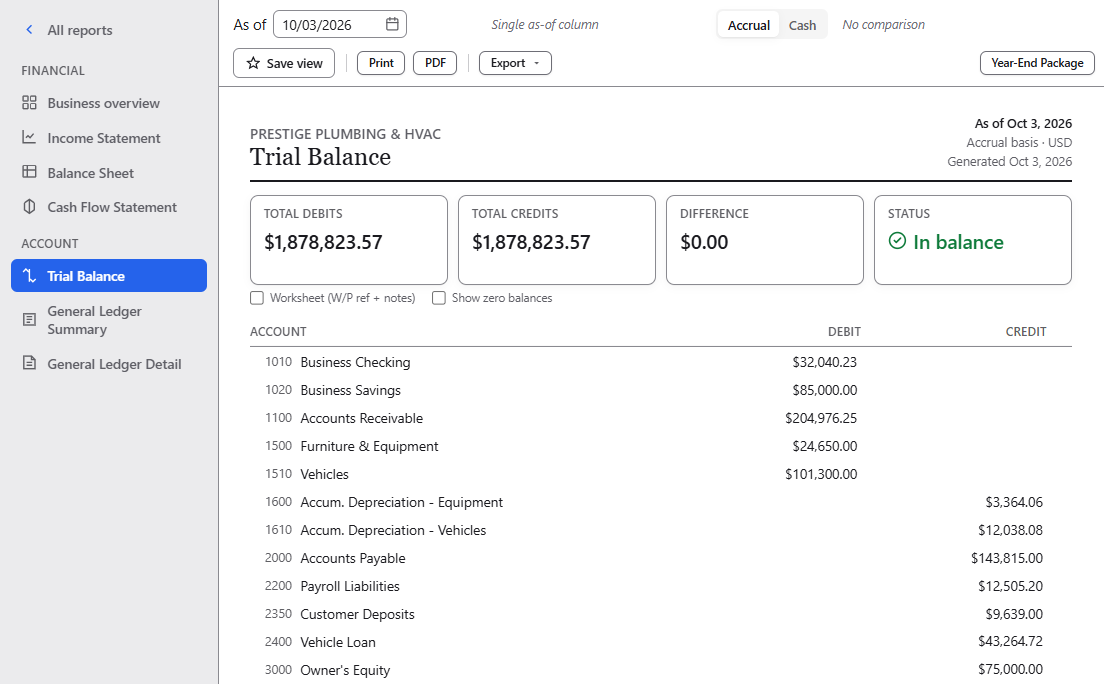
Will it keep working?
Yes.
Keeps working
- The version you bought, and your company file
- Bookkeeping, reports, imports and exports
- AI features and QuickBooks migration
- Restoring existing cloud backups
Needs Updates & Cloud Services
- New releases
- Bank feeds
- New encrypted cloud backups
- Cloud Invoicing
Year 1 is included. After that it’s optional: Standard $99, Professional $129, Accountant $179 a year. See pricing
Switching, answered
Does the migration change my QuickBooks® file?
No. It only reads your QuickBooks company and never writes anything to it. You end up with a new Solid Accounting company file.
Will my balances match?
They should. The comparison report shows every account next to the balance QuickBooks reported. If one or two accounts are off, the migration guide shows how to fix it with a journal entry. Read the migration guide →
How long does it take?
For a typical small-business company file, minutes to import, then an hour or two checking balances against your old books. Large files with many years of history take longer to check.
Can my office keep sharing one company file?
On Professional and Accountant, yes. The computer that holds the company file runs in host mode: other computers on your office network pair with it once using a code, then connect to it. That computer has to stay on while others work. Professional includes 5 users and Accountant 10, each with their own login and role. Standard is a single install with no host mode: up to 3 people, each with their own login, use the same computer. Setting up multi-user →
I use apps that post through the QuickBooks® Web Connector.
Web Connector compatibility is in early access, by request. Tell us which jobs you run and we'll work through your setup with you. QuickBooks Web Connector compatibility →
Can I try it before I buy?
Yes. Run the migration on your own file during the 30-day free trial, which includes every feature. There's also a 30-day money-back guarantee.
Want someone to go through the report with you? Services for business owners
Comparing with cloud subscriptions? See the side-by-side

Try it on your own file.
Run the migration during your 30-day free trial and read the comparison report before you buy. Buy once from $349 and keep using the version you bought. 30-day money-back guarantee.
One-time purchase · 30-day free trial · Windows, macOS and Linux