

 Private accounting
Your books stay on your computer.
Your company file is encrypted and kept on storage you choose. Backups are encrypted on your computer before they leave it, so we can’t read them.
From $349, one time · Company file stored locally by default · Windows, macOS and Linux
Solid Accounting Desktop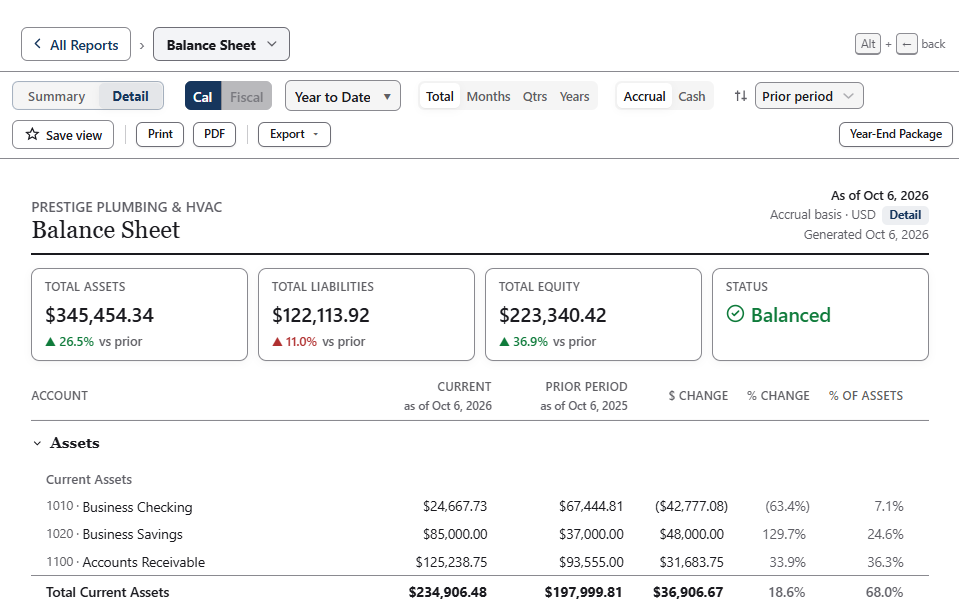
You hold the books. We can't read your backups.
On your computer
The company file is an encrypted database on storage you choose. Copy it, archive it, or hand it to your accountant.
Encrypted before it leaves
Cloud backups are encrypted on your computer first. Our storage holds copies we can’t read.
Optional services, listed
Bank feeds, Cloud Invoicing and your own AI assistant send data out only when you turn them on. Each one is listed below.
Where each piece of your data lives.
What Solid Accounting stores or sends, and who can read it.
| What | Where it lives | Who can read it |
|---|---|---|
| Always | ||
| Your company file | Your computerEncrypted (AES-256). The key is kept in your computer’s keychain, and a recovery phrase you keep opens it on a new computer. | You |
| Backup copies | This computer, plus any folder, USB drive or S3-compatible storage you add | You |
| License record | Our license serverYour name, email, license key and activations | Us |
| Only if you turn it on | ||
| Solid Accounting Updates & Cloud Services encrypted cloud backup | Our cloud storageEncrypted on your computer before upload | Only you |
| Bank feeds | Plaid and our serverOur server passes transactions to your app. Your bank password goes to Plaid, never to us. | PlaidUs |
| Cloud Invoicing | Our serverInvoices you send online, so your customers can view them. Card payments from the link are coming soon. | UsYour customer |
| Accountant’s Copy sent through Solid Accounting | Our server, until your accountant receives itEncrypted on your computer with a passcode we never have. Deleted once received, or after 30 days. | YouYour accountant |
| Your own AI assistant | The assistant’s company, under your account with themClaude, ChatGPT or Gemini, for example. We don’t send it. | That company |
| On-device AI (coming soon) | Your computer | You |
| Usage data and error reports | Our server, kept 90 daysNothing is sent until you answer the first-launch question | Us |
If you use none of the optional services, your accounting data stays on your computer.
Back up where you choose.
Every backup holds the whole company file, including attachments and the Audit Trail. Restore it on this computer or a new one.
This computer
Once backup is on, a copy is kept here every hour while the app is open, and again when you close it.
A folder, a drive or S3
Add a folder that Dropbox, OneDrive, Google Drive or iCloud syncs, a USB drive, or your own S3-compatible bucket.
Solid Accounting Updates & Cloud Services
Encrypted cloud backup on an automatic schedule. Storage: Standard 3 GB, Professional 5 GB, Accountant 10 GB.
A 12-word recovery phrase. You write it down at setup. Your password or the phrase unlocks your backups.
No back door. If you lose both the password and the phrase, nobody can open the backups, including us.
Kept for you. Cloud backup keeps 7 daily, 4 weekly, 12 monthly and 5 yearly copies.
If you stop renewing, your existing cloud backups stay restorable, and backups to your own storage keep working.

Keep your books on your own computer.
Buy Solid Accounting once from $349 and keep using the version you bought. Renew Updates & Cloud Services when you want new releases and connected services. 30-day free trial. 30-day money-back guarantee.
Company file on your computer · Optional connected services · On-device AI coming soon